




&media=https://www.pilover.com/wp-content/uploads/2019/08/kit-keybow-12-keys-Kailh-Speed-keys.jpg)
Keybow Kit: 12 Linear (Raspberry Pi Included)
Original price was: 64,99€.45,50€Current price is: 45,50€.
Lowest price in the last 30 days: 64,99€
Discount -30%In stock

 Do you have any further questions?
 Keybow Kit with 12 Keys (Linear) and Raspberry Pi Zero WH Included
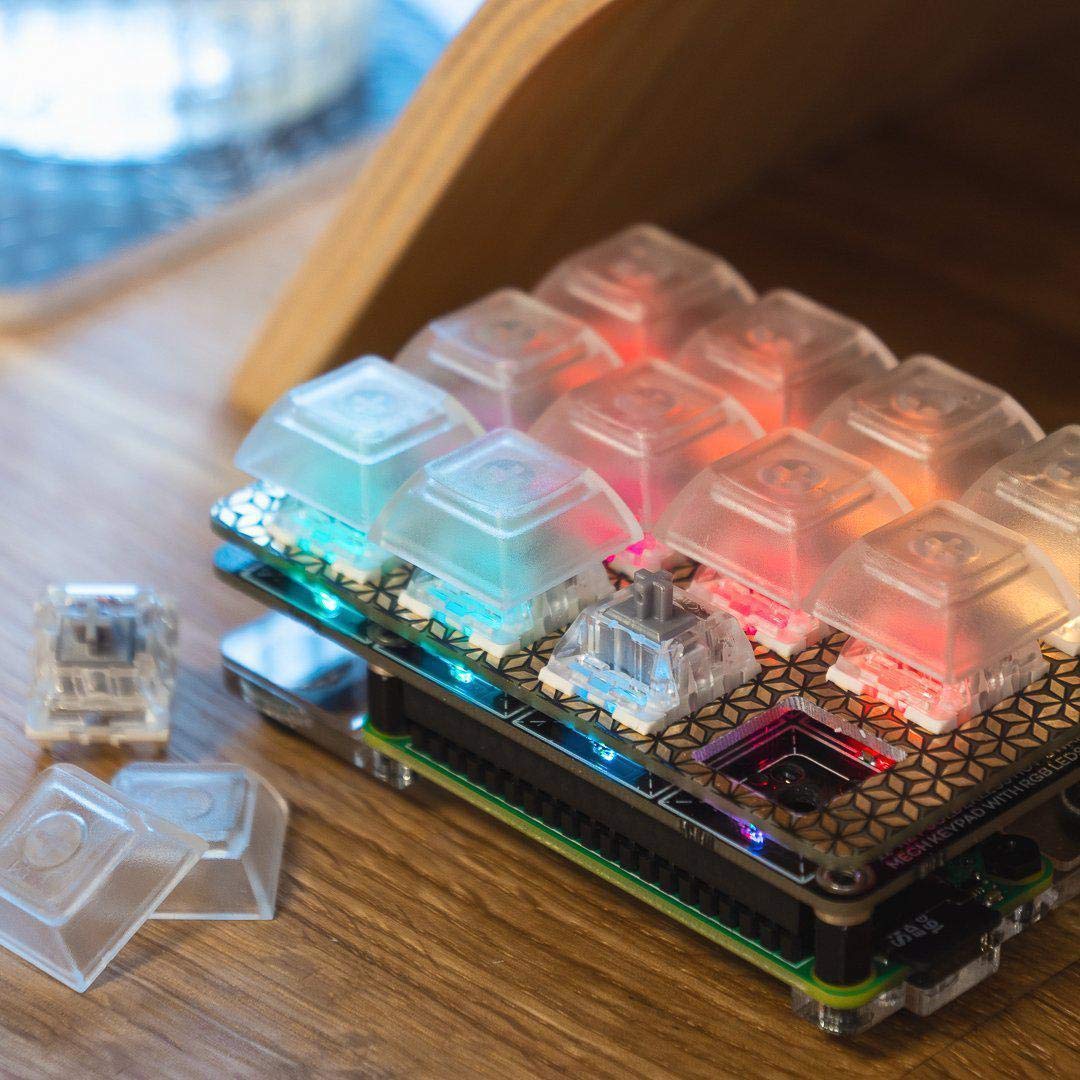
This Keybow Kit is a fantastic DIY mechanical mini keyboard. It requires no soldering and is very easy to build. It is the latest Raspberry Pi-powered macro pad. It features twelve illuminated linear switches. The keys are transparent and slightly frosted, and you will definitely appreciate both its customisable design and powerful macros.
In this kit you will find everything you need* to build your own mini mechanical keyboard. As the price is very affordable, you can step into the fascinating world of mechanical keyboards.
You will surely appreciate the high quality Kailh Speed silver switches and be impressed by the transparent DSA-profile keycaps. The RGB lighting on each key gives an amazing look whenever they are illuminated.
In addition, thanks to the Kailh hot-swap sockets, no soldering is required.
The 12-Key Linear Keybow Kit includes*
- Raspberry Pi Zero WH board
- Keybow PCB
- Switch plate
- Twelve Kailh Speed silver switches
- Twelve transparent DSA-profile keycaps
- Acrylic base plate
- Standoffs and rubber feet
- Micro-USB cable
- Reusable packaging box
*You only need to add a micro-SD card, as it is not included in this kit.
You can use this product in many different ways. It can be used as a hotkey pad for software such as Adobe Lightroom, to create effects, clips and tracks in Ableton Live, or to paste code snippets or frequently used text, and much more. With a single key, the possibilities are huge. The device allows full customisation of both keys and lighting, and lets you switch your setup between different devices.
This Keybow is powered by a Raspberry Pi Zero WH (with pre-soldered header). Using the USB HID gadget mode of the Zero, it will appear as a real keyboard. Simply connect it to your computer using a USB cable (included). The RAM-disk based custom Keybow operating system and powerful Lua interface make both the layout and lighting fully customisable. It is compatible with Mac, Windows, and Linux.
Keybow 12 Linear Keys Kit Features
- RGB LED per key (APA102)
- Kailh hot-swap switch sockets (Cherry MX compatible)
- 40-pin female header
- I2C breakout header for add-ons
- Custom Keybow OS
- Compatible with Raspberry Pi 4, 3B+, 3, 2, B+, A+, Zero, and Zero W
- Dimensions (assembled): 85 × 56.5 × 38 mm
Watch the video below to see how to use Keybow to control Ableton Live, trigger track muting and effects, and switch between different plugins.
How to Assemble the 12-Key Keybow Kit
Like all standard Raspberry Pi HATs, the Keybow PCB features a 40-pin female header that connects to the 40-pin male header on the included Raspberry Pi Zero WH. While the Raspberry Pi is secured to the shim and acrylic base, the whole assembly is firmly held together using metal spacers. Keybow will not slide around thanks to the rubber feet on the base, keeping it stable on your desk.
Switch mechanics
The transparent, slightly frosted DSA keycaps of Keybow highlight the RGB LEDs beautifully, producing a pleasant glow. Being DSA-profile, they are perfectly suited to the compact layout of the Keybow.
No soldering is required, as the switches simply snap into the switch plate on the PCB and then fit securely into the Kailh hot-swap sockets on the Keybow PCB. This extremely simple assembly method also allows you to easily swap switches whenever you want.
If you decide to use different switches with this Keybow, make sure they have enough clearance underneath for the surface-mounted LEDs.
Lighting: APA102 RGB LEDs
The LEDs used in this Keybow are the same as those found on Picade Plasma PCBs, namely APA102 RGB LEDs. There is one LED under each of the twelve keys, shining through the transparent keycaps.
You can customise and animate the LEDs however you like. For example, you can create a PNG file with a colour pattern or gradient, which will be animated from top to bottom across the LEDs and displayed according to the image pattern.
LEDs can be controlled individually or in groups, bypass animations, or light up only when keys are pressed.
You can explore animation examples using any graphics software, or create your own custom animations.
Keybow Key Layout and Mapping
One of Keybow’s biggest advantages is its full customisation. Each of the twelve keys can be mapped to any keyboard key you want, or configured to trigger key combinations or text strings.
The Keybow software uses the Raspberry Pi Zero W’s micro-USB OTG port and USB HID mode. So, it behaves like a standard USB keyboard when connected to a computer.
The simple operating system runs on a RAM disk, meaning it boots quickly, runs reliably when unplugged, and avoids any risk of SD card corruption.
To customise your Keybow layout and lighting, simply remove the micro-SD card and edit the keys.lua file on your computer.
The Keybow software also includes many code snippets and helper functions for Mac and Windows that you can use for your layouts. You will also find example configurations to turn your Keybow into interesting tools such as a Pico-8 game controller, an Adobe Lightroom hotkey pad, or a simple numeric keypad.
1 review for Keybow Kit: 12 Linear (Raspberry Pi Included)
Show only reviews in English (0)
You must be logged in to post a review.
-
Original price was: 21,81€.15,27€Current price is: 15,27€.
Keybow Kit: 3-key Clicky keyboard
-
Original price was: 21,81€.15,27€Current price is: 15,27€.
Keybow Kit: 3-key linear keyboard
-
Original price was: 64,99€.45,50€Current price is: 45,50€.
Keybow Kit: 12 Clicky Keys (Raspberry Pi Included)
-
22,12€
RoboHAT: Controller Robotico completo
-
12,93€
Servo Bonnet per RPI con 16 Canali PWM
-
22,39€
Servo HAT per RPI con 16 Canali PWM – Mini Kit
-
Original price was: 2,55€.1,27€Current price is: 1,27€.
PiCan Prototyping Shield
-
Original price was: 13,59€.6,79€Current price is: 6,79€.
Shield Go-24V MKR


-
Original price was: 64,99€.45,50€Current price is: 45,50€.
Kit Keybow: 12 tasti clicky, Pi Zero WH incluso
-
5,78€
Garden Extenders (I2C) (3 pcs)
-
11,73€
Breakout Garden pHAT (I2C)
-
16,32€
Breakout Garden HAT (I2C)
-
20,82€
GFX HAT – 128×64 backlit LCD
-
68,94€
HyperPixel 4.0 – Hi-Res Touch Display
-
44,65€
HyperPixel 4.0 – Display Hi-Res Non-Touch
-
Original price was: 19,90€.13,93€Current price is: 13,93€.
SmartiPi Case for Pi 2 and B+




 5% discount on every order reviewed!
 Raspberry Pi IN STOCK!

sergio f… (verified owner) –
Kit un pò costoso ma utilissimo se hai bisogno di avviare programmi, o eseguire script rapidamente. Spedizione molto veloce