


 Raspberry Pi IN STOCK!


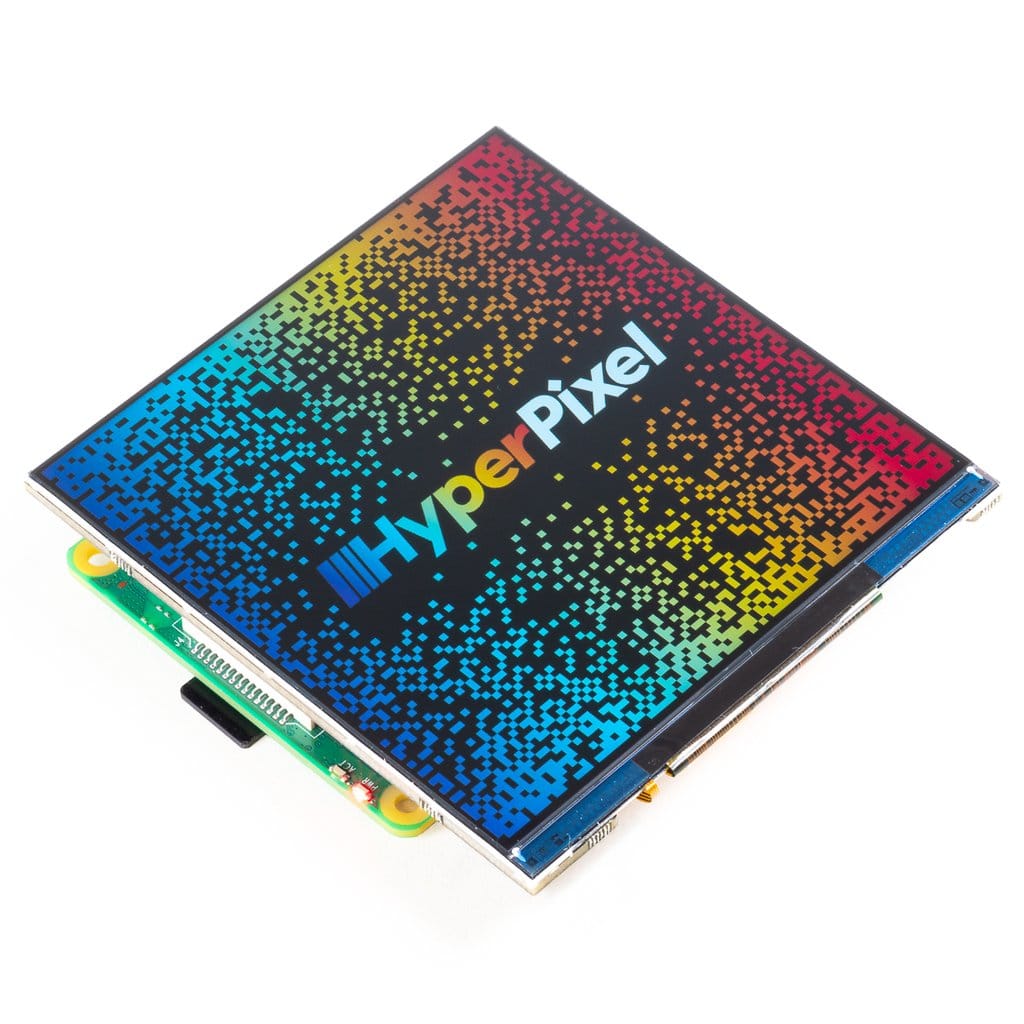


HyperPixel 4.0″ Square Non-Touch
69,44€
In stock

 Do you have any further questions?
 High-Resolution Display for Raspberry Pi: HyperPixel 4.0″ Square Non-Touch
This 4.0″ square display is fantastic! It offers high resolution, high speed, and a perfectly square format. Along with all the excellent features of the standard HyperPixel 4.0, this IPS display ensures outstanding sharpness and brightness, combined with a high-speed DPI interface.
This new, exclusive version of the HyperPixel 4.0″ features control panels, customizable interfaces, and even works well with Pico-8 games. It is very easy to use, as it comes pre-soldered and ready to go. To get started, simply place it onto your Raspberry Pi board and run the installation.
The images of this product are NOT Photoshopped. What you see is the actual Raspbian desktop with the HyperPixel Square wallpaper.
HyperPixel 4.0″ Square Non-Touch features are:
- High-speed DPI interface
- 4.0″ IPS display (7.2 × 7.2 cm) with wide 160° viewing angle
- 720 × 720 pixels (~254 PPI)
- 18-bit colour (262,144 colours)
- 60 FPS frame rate
- The included 40-pin female header allows you to increase the height for RPi B+, 2, 3, 3B+, 4B
- Standoffs included for secure mounting to your RPi
- Compatible with all Raspberry Pi models with a 40-pin header
- One-line installation command
Note: This version of HyperPixel is not yet compatible with Raspberry Pi OS Bullseye.
This HyperPixel 4.0″ square non-touch display uses a high-speed DPI interface. Unlike most small Raspberry Pi displays that typically use an SPI interface, the DPI interface can transfer data up to 5 times faster than a standard SPI interface.
Additionally, the HyperPixel 4.0″ delivers a resolution of approximately 254 pixels per inch (720 × 720 px) on its 4.0″ display, along with a 60 FPS frame rate. It also offers 18-bit color, for a total of 262,144 colors.
Be careful not to press on the screen surface when installing the HyperPixel 4.0 Square onto your Raspberry Pi. Hold the board by its edges and gently move it back and forth when connecting it to the extended header or GPIO header.
The HyperPixel 4.0 Square non-touch works with all Raspberry Pi boards with a 40-pin header, including the Raspberry Pi Zero and Raspberry Pi Zero W. An additional 40-pin connector is included in the package. You can use it to achieve the necessary height if you are using a larger Raspberry Pi board. Simply connect it to the GPIO if you are using a Raspberry Pi Zero or Zero W.
Using the included standoff kit, you can securely mount the HyperPixel 4.0 Square display to your Raspberry Pi board without any risk.
It’s very simple: screw the standoffs into the mounting points located on the underside of the HyperPixel PCB, then secure it to your Raspberry Pi using screws through the mounting holes.
Software
To easily configure your Raspberry Pi for the HyperPixel 4.0 Square non-touch, a one-line installation command has been provided (GitHub HyperPixel 4.0 non-touch). To install the software, you will need another display, keyboard, and mouse.
You can also run the command remotely via SSH. Simply open a terminal and start the installation of your HyperPixel 4.0″ Square by typing: curl https://get.pimoroni.com/hyperpixel4 | bash to run the one-line-installer.
Note:
The images shown here display the HyperPixel 4.0″ Square from the side. You will notice that the bezels are slightly narrower and wider at the top and bottom respectively, but the difference is minimal: 5.5 mm on the left and right sides, 4.5 mm on the top, and 6.5 mm on the bottom. Overall dimensions are 84 × 84 × 9.5 mm (W × H × D), including the header and display thickness.
Pimoroni name: HyperPixel 4.0 Square – Hi-Res Display for Raspberry Pi – Non-Touch [PIM475]
Show only reviews in English (0)
You must be logged in to post a review.


-
44,65€
HyperPixel 4.0 – Display Hi-Res Non-Touch
-
76,79€
HyperPixel 4.0 Square Touch
-
46,38€
RasPiKEY: SD Plug&Play eMMC – 32GB
-
35,59€
RasPiKEY: SD Plug&Play eMMC 16GB
-
15,24€
Audio Amp SHIM: Amplificatore Mono 3W
-
19,10€
Audio DAC SHIM: Line-Out
-
21,79€
Pico Display Pack
-
22,63€
Grow HAT Mini: Monitora le tue piante


 5% discount on every order reviewed!

Reviews
There are no reviews yet.